
Step 1 – Choose a Regulated Broker
Before placing your first trade, you need a broker — the company that executes your buy and sell orders in the market.
Not all brokers are equal. The only safe option is a regulated broker.
What "Regulated" Means
A regulated broker operates under the supervision of a recognized financial authority that enforces:
- Segregation of client funds (your money is kept in separate accounts).
- Transparency in execution and reporting.
- Minimum capital requirements to ensure the company's stability.
- Audits and compliance checks to protect traders from fraud.
Think of regulation as your financial airbag: it only matters when things go wrong — and that's exactly why it's critical.
Top-Tier Global Regulators
| Region | Regulator | Description |
|---|---|---|
| Australia | ASIC – Australian Securities & Investments Commission | Global leader in retail trading regulation. |
| United Kingdom | FCA – Financial Conduct Authority | Strict protection rules for traders, including client-fund insurance. |
| Europe | CySEC – Cyprus Securities and Exchange Commission | Enforces EU standards, frequent audits, and transparency. |
Important: Avoid offshore "registrations" (e.g., St. Vincent, Seychelles, Belize). These are not true regulators.
Quick Action – Open Your Demo Account
- Visit the broker's official website (never via ads or third-party links).
- Select "Open Demo Account."
- Choose your platform — C-Trader (recommended) or MT5.
- Create a demo balance (typically $10 000 – $100 000 virtual funds).
- Save your login credentials — you'll use them in Step 2 to connect your trading platform.
Goal for this step: Open a demo account with a regulated broker within 10 minutes.
Step 2 – Install Your Trading Platform
Now that you have a demo account with a regulated broker, it's time to install the platform you'll use to execute trades.
This is where you'll analyze charts, set entries, and manage positions.
Your Two Main Choices

| Platform | Best For | Highlights |
|---|---|---|
| C-Trader (Recommended) | Beginners → Intermediate Traders | Clean, modern interface Built-in risk calculator before entry Lightning-fast execution with Pepperstone and HFM Direct depth-of-market view (Level 2 pricing) |
| MetaTrader 5 (MT5) | Experienced traders and EA users | Massive community of indicators & scripts Supports Expert Advisors (EAs) and automation Multi-asset trading (forex, indices, metals, crypto) Lightweight mobile and desktop apps |
Which Should You Choose?
If you're new to trading → choose C‑Trader. It's simpler to use, supports C# and major languages, and works great with AI to help you code scripts, trading tools, and bots. It also has a built‑in risk calculator and supports multiple take‑profit targets out of the box.
Use MT5 only if your broker doesn't support C‑Trader, or if you have very specific needs that require MT5.
We strongly recommend C‑Trader for most traders.
Safe Download Process
- Go to your broker's official website (for example Pepperstone, HFM, Swissquote).
- Find the section called "Platforms" or "Download Center."
- Choose the version that matches your device (Windows, macOS, iOS, Android).
- Install the app directly from the broker's link. Never download from forums or third-party sites.
- Log in using the demo credentials from Step 1.
Once logged in, you should see your demo balance and be ready to load a chart for US30.
Goal for this step: Have your platform installed and connected to your demo account within 10 minutes.
Step 3 – Understand Basic Risk Management
Before pressing "Buy" or "Sell," you must first decide how much you're willing to lose if the trade goes wrong.
Professional traders don't think in profits first — they think in risk.
The 1% Rule
Until you master dynamic risk, follow this simple rule:
Never risk more than 1% of your account balance on any single trade or group of trades built around one idea.
Example:
- If your demo account is $10,000 → your maximum total loss is $100.
- If you open two or three positions in the same idea (for example, scaling into one setup), their combined total loss must not exceed 1% ($100).
It doesn't matter if it's one position or three — the total loss if all stop losses are hit must still equal 1% of your account.
How to Apply It
| Account Balance | Max Risk (1%) | Max Combined Loss |
|---|---|---|
| $1,000 | $10 | $10 total (even across multiple trades) |
| $5,000 | $50 | $50 total |
| $10,000 | $100 | $100 total |
| $25,000 | $250 | $250 total |
Your Stop Loss (SL) defines how much you can lose, and your position size (lot size) adjusts so that the total potential loss across all positions stays near 1%.
How to Calculate Position Size
You have two simple ways to calculate how much to trade:
Option 1 – Use the Platform Calculator
Both C-Trader and MT5 allow you to preview your risk before confirming a trade.
- Set your entry, stop loss (SL), and account balance.
- The platform will show exactly how many lots to trade to keep your total risk near 1%.
C-Trader Tip: It shows your dollar risk live on the order screen — use it before every trade.

Option 2 – Use AI to Help You Calculate
If you're using an AI model like SkyAnalyst AI, you can ask it directly:
"My account is $10,000. I want to risk 1%. My entry is 39,850 and my stop loss is 39,750 on US30. How many lots should I trade?"
The AI will instantly give you the exact lot size to use, ensuring your loss never exceeds 1%.
You can even send a screenshot of your planned trade (showing entry and stop loss) and tell the AI your account balance — it will calculate the position size automatically.
Any modern AI model can do this instantly.
Why This Matters
You will learn in later modules why risk management is the foundation of trading — but here's the short truth:
- Losing streaks are inevitable. Even the best traders lose 10–20 trades in a row at times.
- It's mathematically impossible to avoid drawdowns.
- The longer you trade, the higher the probability of experiencing a losing streak — it's part of the statistical nature of markets.
That's why strict risk management is not optional — it's what keeps you in the game long enough to learn consistency.
The Psychology Behind It
- Keeps emotions under control.
- Prevents a single bad trade (or series of them) from destroying your account.
- Builds the discipline and resilience every professional trader develops over years.
Goal for this step:
Learn to use either your platform's calculator or AI assistance so that every trade — or group of trades — risks no more than 1% of your account balance.
Step 4 – Set Up Your Analysis Workspace
You now have a demo account and know how to manage risk.
Next, you'll learn how to read the market using a clean, professional chart setup.
Your Analysis Tool: TradingView
Go to https://www.tradingview.com and create a free account.
TradingView is a web-based platform used by millions of traders to view charts, draw zones, and apply indicators.
It's fast, intuitive, and integrates perfectly with SkyAnalyst AI.
Step-by-Step Setup
- Open TradingView → Click "Chart."
- In the top-left search bar, type US30 and select the Pepperstone feed (if available).
This ensures your chart data matches SkyAnalyst AI's feed.
- Switch the timeframe to 5 minutes — this is ideal for intraday analysis.
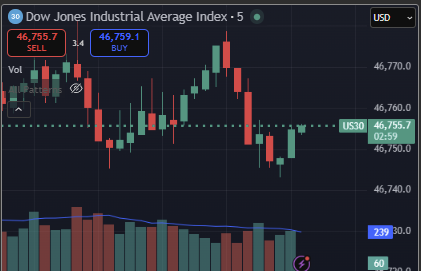
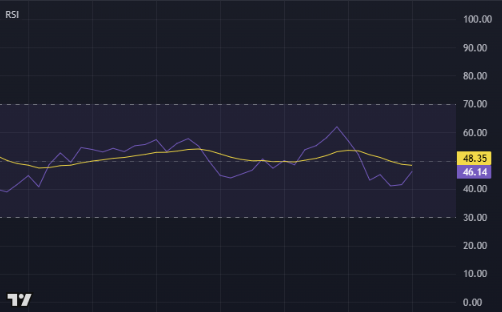
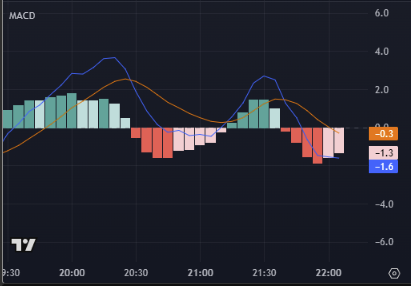
- Add these essential indicators:
- Volume
- RSI (14)
- MACD (12, 26, 9)
- (Optional later: 20 EMA & 50 EMA for trend context)
- Save your chart layout — name it "US30 – Base Template."
Volume
RSI (14)
MACD (12, 26, 9)
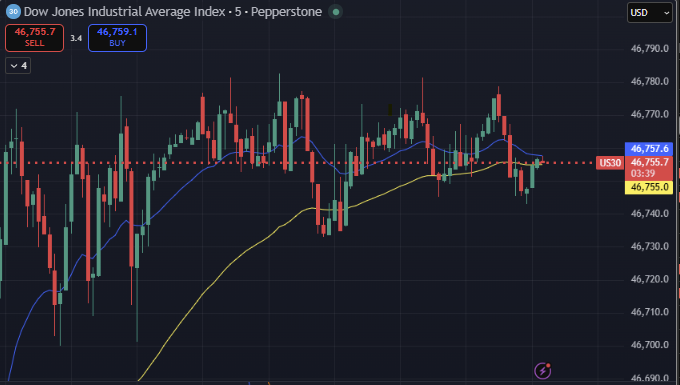
EMA 20/50
What Each Indicator Does
| Indicator | Purpose | Interpretation |
|---|---|---|
| Volume | Measures participation | Rising volume = stronger conviction. |
| RSI (14) | Momentum & overbought/oversold | Above 70 = overbought · Below 30 = oversold. |
| MACD (12, 26, 9) | Trend & momentum crossovers | MACD > Signal = bullish · MACD < Signal = bearish. |
| 20/50 EMA | Dynamic trend direction | Crossovers signal shifts in short/medium trend. |
(These will make more sense once SkyAnalyst AI begins interpreting them for you.)
Pro Tip – Use AI to Validate Your Chart
Once your indicators are ready, you can ask SkyAnalyst AI things like:
"Based on my RSI, MACD and Volume on US30 5-minute chart, what's the current bias?"
or
"Is the MACD cross confirmed, and what's the logical stop area?"
AI can instantly read your indicator context and explain what it sees — teaching you how to interpret signals like a professional.
Bonus – Visual Learning
You can also take a screenshot of your chart and upload it to SkyAnalyst AI.
She'll read the image, identify your entries, RSI/MACD levels, and explain how they align with her CMT-style logic.
Goal for this step:
Have a clean TradingView layout for US30 5-minute, with Volume, RSI and MACD ready to use alongside AI analysis.
Step 5 – Place Your First Trade (US30 Example)
Now that your tools are ready — it's time to take your first simulated trade.
This is where you'll put everything together: your platform, chart setup, and risk control.
What You'll Learn in This Step
- How to execute a trade on C-Trader or MT5.
- How to size your position correctly (1% rule).
- How to confirm entries and stops with SkyAnalyst AI before placing the order.
Step-by-Step: Executing the Trade
1. Choose the Market
Select US30 (Dow Jones Industrial Index) inside your platform.
2. Identify the Setup
Use your TradingView chart or SkyAnalyst AI's analysis to decide your entry zone, stop loss (SL), and take profit (TP).
Example:
- Entry: 39,850
- Stop Loss: 39,750
- Take Profit: 40,050
This represents a 100-point stop and 200-point target, giving you a 2:1 reward-to-risk ratio.
3. Calculate Position Size
Use your platform's calculator or ask SkyAnalyst AI:
"My account is $10,000. Entry 39,850, SL 39,750. Risk 1%. How many lots should I trade on US30?"
The AI will instantly give you the correct lot size so your loss never exceeds $100 (1%).
C-Trader Tip: Before confirming, it shows your dollar risk live — use this every time.
4. Place the Order
In your platform:
- Select New Order.
- Enter your Entry, Stop Loss, and Take Profit.
- Enter the lot size calculated in Step 3.
- Double-check all numbers — especially the stop loss.
- Confirm and place the trade.
5. Monitor the Trade
- Keep your chart open.
- Observe how price moves relative to your entry and stop.
- Avoid changing your plan mid-trade — let it play out.
You can ask SkyAnalyst AI to track the logic:
"If this US30 setup reaches my stop, what does that tell me about market structure?"
This helps you learn from every trade, win or lose.
Understanding What Comes Next
You will have winning trades and losing trades — both are essential for learning.
What matters most is that every loss is controlled and consistent (1% or less).
That's how professional traders survive long enough to become consistent.
Goal for this step:
Execute your first demo trade on US30, with the correct entry, stop, take profit, and risk size.
Step 6 – Join the SkyAnalyst AI Telegram Channel
You've reached the most exciting part of your quick-start journey — seeing SkyAnalyst AI in action and learning directly from real market examples shared by professional traders.
This is where you start connecting your theory with live trading environments — safely, through demo trading.
How to Join
The SkyAnalyst Community Telegram channel is open to members with an active or trial account.
(Once inside the app, you will find the invite link in Settings → Community.)
What You'll Receive
Every market day between 9:00 and 9:30 a.m. EST, we share:
- Daily market analysis powered by SkyAnalyst AI — focused on US30 and key assets.
- Our professional view, combining technical and macro context through a CMT-style lens.
- Educational live trades, where we show how we apply SkyAnalyst AI's analysis in real time.
These educational trades allow you to practice in demo mode alongside professionals, see how they plan entries, manage risk, and interpret AI insights.
How to Use the Channel Effectively
-
Demo Trade Alongside Us
- Open your demo platform each morning.
- Follow the shared analysis and trade logic for learning purposes.
- Don't worry about performance — focus on understanding the why behind each decision.
-
Observe How AI and Humans Work Together
- Watch how SkyAnalyst AI identifies setups using technical confluence.
- Compare her reasoning with how professional traders apply structure, timing, and discipline.
-
Practice Proper Risk Management
- Every trade idea we share uses the 1% risk rule.
- You'll see live examples of trade sizing, stop placement, and emotional discipline.
- Copying the process, not the position, is what will make you consistent.
-
Ask AI to Explain What You See
- After reviewing a shared setup, ask SkyAnalyst AI to explain the reasoning:
"Why did you favor that entry zone?"
"What's the logic behind this stop placement?" - This helps you internalize CMT-level reasoning faster.
- After reviewing a shared setup, ask SkyAnalyst AI to explain the reasoning:
What to Expect Inside
- A structured flow of daily market insights — clear, educational, and actionable in demo mode.
- Guidance to help you become familiar with SkyAnalyst AI's tools, trading platforms, and analysis style.
- A community of traders learning together — testing ideas, building confidence, and improving discipline.
- A gradual transition from basic chart reading to structured analysis and execution.
Important Disclaimer
All content shared within the Telegram channel — including analysis, commentary, and trade examples — is strictly for educational purposes only.
- SkyAnalyst AI and its team do not provide trading signals or investment advice.
- Past performance, whether hypothetical or simulated, does not guarantee future results.
- Trading involves substantial risk of loss and is not suitable for all investors.
- You should always practice on a demo account until you fully understand the tools, platforms, and risk management principles.
- Never risk real funds based on educational material or shared examples.
The Learning Philosophy
SkyAnalyst AI was designed to teach you how to think like a professional, not to tell you when to trade.
By demo trading alongside pros, you'll begin to understand:
- Market structure and timing
- Emotional control during uncertainty
- Dynamic risk and exposure management
- How to build discipline that lasts through losing streaks and volatility
Each day in the Telegram channel brings you closer to mastering real decision-making under risk — the hallmark of consistent traders.
Goal for this step:
Join the Telegram channel and begin demo trading alongside the professional traders, using SkyAnalyst AI to understand analysis, practice risk management, and gain confidence in both your platform and process.
Step 7 – Continue Your Learning
You've completed your quick-start training — you know how to open trades, manage risk, and follow the daily AI analysis.
Now it's time to strengthen your foundation before trading independently.
Your Next Steps
Continue with the next two learning cards:
-
Fundamentals, Psychology, Technical Analysis & Dynamic Risk
→ Learn the key principles that shape every professional decision: market logic, trader mindset, and advanced risk control. -
How to Use SkyAnalyst AI
→ Discover how to interact with the AI effectively, ask the right questions, and integrate it into your daily trading routine.
Your Goal
Move through these two cards at your own pace while staying in demo mode.
They'll help you understand not just how to trade — but why the best traders make each choice.
Goal for this step:
Start with Fundamentals, Psychology, Technical Analysis & Dynamic Risk, then continue with How to Use SkyAnalyst AI.
Step 8 – Completion & Next Steps
Congratulations — you've completed your Trading in 30 Minutes quick-start journey!
You now know how to:
✅ Open and use your trading platform
✅ Manage risk with confidence
✅ Follow SkyAnalyst AI's daily analysis
✅ Demo trade alongside professionals safely
What Comes Next
Your next destination is the SkyAnalyst Community — where learning meets discussion. Here you'll:
- Read other members' trade recaps — wins, losses, and the reasoning behind each
- See how the community discusses AI Trader outputs and what played out vs what was predicted
- Ask your own questions about setups, risk, the platform, or strategy
Remember: this is still for education only — keep practicing in demo mode until you're consistently disciplined and confident.
Stay Connected
Stay active in our Telegram community and continue exploring the next cards:
- Fundamentals, Psychology, Technical Analysis & Dynamic Risk
- How to Use SkyAnalyst AI
Each one will strengthen your foundation and bring you closer to mastery.
Goal for this step:
Join the SkyAnalyst Community, keep practicing in demo mode, and continue building your knowledge through daily AI analysis.